

Titlevision Sub Machine

Sub Machine Tools - Batch file converter

Convert subtitle files between any supported format — in bulk. Transform entire project libraries in a single operation, directly inside Titlevision Sub Machine.

What is the Batch File Converter?

The Batch File Converter is a built-in tool within Titlevision Sub Machine that lets professional subtitlers convert from any supported input subtitle format to any supported output format — all in bulk. Instead of opening each file individually, choosing “Save As” in a different format, and repeating the process dozens of times, the Batch File Converter processes entire folders of subtitle files in one operation. Select your source files, choose the target format, and let the converter handle the rest. Whether you’re delivering to Netflix in DFXP, to a broadcaster in EBU STL, or archiving in SRT — you can convert your entire project library in seconds.
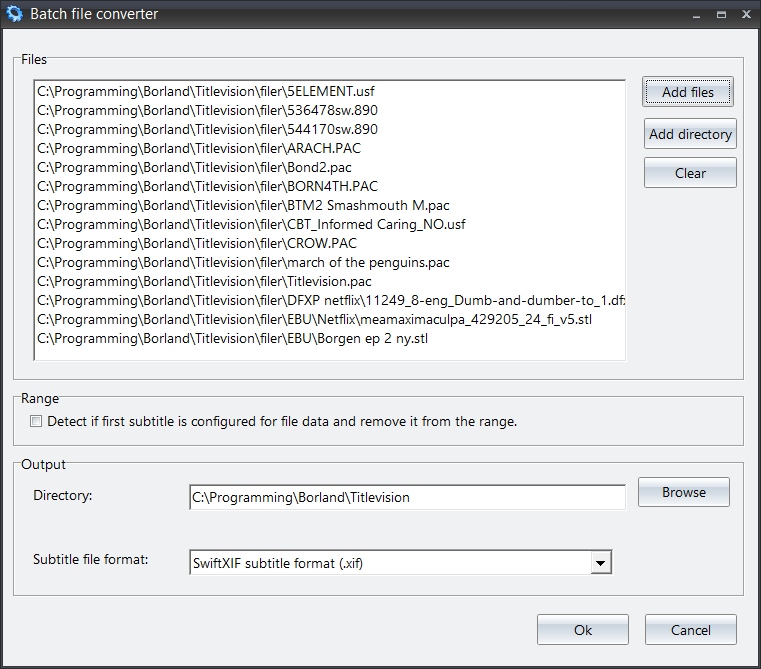
Titlevision Batch File Converter screenshot

30+ Subtitle Formats

Titlevision Sub Machine reads, writes, imports, and exports an extensive range of industry-standard subtitle formats. The Batch File Converter can convert between all of them.

Native Read & Write

Open and save directly in these core formats.

  • Universal Subtitle Format (.usf)
  • Compressed PAC (.pac)
  • Unicode PAC (.fpc)
  • Screen RAC (.rac)
  • Scantitling 890 (.890)
  • Spruce STL (.stl)
  • Plain Text (.txt)

Export Formats

Export to delivery-ready formats for broadcasters, streamers, and cinemas.

  • EBU STL (.stl)
  • Netflix Timed Text DFXP (.dfxp)
  • Timed Text Markup Language (.xml)
  • SubRip (.srt)
  • WebVTT (.vtt)
  • Swift XIF (.xif)
  • SMPTE Digital Cinema Package (.xml)
  • Apple Final Cut Pro (.xml)
  • Adobe Encore (.txt)
  • Sonic Solutions DVD (.son)
  • Philips DVD (.txt)
  • Screen Poliscript (.txt)
  • DLP Digital Cinema (.xml)
  • Deluxe Coded Cinema (.uns / .tsf)
  • RTF Manuscript (.rtf)
  • RTF Subtitles (.rtf)

Import Formats

Bring in subtitle files from other tools and workflows.

  • EBU STL (.stl)
  • Netflix Timed Text DFXP (.dfxp)
  • Timed Text Markup Language (.xml)
  • SubRip (.srt)
  • WebVTT (.vtt)
  • Swift XIF (.xif)
  • Sonic Solutions DVD (.son)
  • Spruce DVD STL (.stl)
  • Deluxe Coded Cinema (.uns / .tsf)
  • Screen Poliscript (.txt)

Manuscript & Text

Import scripts and manuscripts, export formatted documents.

  • Film Manuscript (.docx)
  • RTF Manuscript (.rtf)
  • RTF Subtitles (.rtf)
  • Plain Text with Timecodes (.txt)
  • Clipboard Text (auto-split)

Three Steps to Batch Convert

The Batch File Converter is designed to be straightforward. No complicated setup — just select, configure, and convert.

1

Select Source Files

Choose a folder containing your subtitle files, or select individual files. The converter auto-detects the input format of each file (USF, PAC, SRT, EBU STL, etc.).

2

Choose Target Format

Pick the output format you need — from SRT for web delivery, to EBU STL for broadcast, to DFXP for Netflix. Set the output directory for the converted files.

3

Convert in Bulk

Hit convert and the tool processes every file in the selection. Entire project libraries are transformed in seconds, with full format accuracy preserved.

Command Line Automation

For even more power, the Batch File Converter can be driven from the command line — perfect for scheduled tasks, batch scripts, or integration with other tools.

# Convert a single file from USF to PAC
Titlevision2011.exe convertfile hotshots.usf hotshots.pac

# Batch convert an entire directory to USF format
Titlevision2011.exe convertdirectory c:\subtitles\ c:\converted\ usf

Key Benefits

The Batch File Converter saves professional subtitlers significant time and eliminates repetitive manual work.

Massive Time Savings

Convert hundreds of subtitle files in seconds instead of opening and saving each one individually. Turn a 2-hour task into a 10-second operation.

Format Accuracy

Preserves timing, formatting, metadata, and character encoding across all conversions. No data loss, no broken cues, no missing italics.

Any-to-Any Conversion

Convert between any supported input and output format. From legacy PAC and 890 files to modern DFXP, TTML, and SRT — all in one step.

Command Line Support

Automate conversions via command line parameters. Integrate with scheduled tasks, batch scripts, or your own automation workflows.

📁

Directory-Level Processing

Point the converter at an entire directory and transform every file at once. No need to select files individually for large projects.

🔗

Part of Sub Machine

Fully integrated into the Titlevision Sub Machine suite. Works alongside the video cache, audio graph, AI transcription, and File Validator tools.