

Titlevision Sub Machine
Sub Machine - State of the art subtitling tool for all versions of Windows
Created by professional subtitlers, for professional subtitlers. Scene change detection, audio graph, AI-powered transcription, and 30+ file formats — all in one powerful desktop application.
Why Choose Sub Machine?
Since 1996, Titlevision has been building software that solves the real problems subtitlers face every day. Sub Machine version 4.0 is the culmination of decades of refinement — designed by people who actually subtitle for a living.
🎬 Advanced Video Cache System
Go far beyond simple play/stop/fast-forward. Sub Machine gives you frame-by-frame stepping, 1-second jump-back-and-play, configurable frame jumps, and full mouse-based cueing. The integrated video cache converts any clip to industry-standard H.264, while simultaneously detecting scene changes and generating a visual audio graph — all while you work.
🔍 Automatic Scene Change Detection
Stop wasting precious time hunting for scene changes manually. Sub Machine’s intelligent scene detection engine automatically identifies every cut and transition in your video, marking them on the audio graph timeline. You can then snap your subtitle cues to scene boundaries with a single keystroke, ensuring professional broadcast-quality results every time.
📊 Interactive Audio Graph
The audio graph bar is your visual command center. It displays five layers of information at once: the waveform of the sound track, your cued subtitle positions, subtitle text content, detected scene end markers, and a precise seconds-based timeline. Navigate, cue, and fine-tune your subtitles with unmatched visual clarity.
🤖 AI-Powered Transcription & Translation
Harness the power of OpenAI’s Whisper and GPT-4 directly inside Sub Machine. Automatically transcribe spoken audio into perfectly timed subtitles, then optionally translate them into any target language — all in one seamless operation. What used to take hours of manual work now happens in minutes with context-aware, high-accuracy results.
📁 30+ File Formats Supported
Sub Machine reads and writes an unrivalled range of industry formats: USF, PAC, FPC, RAC, 890, STL, EBU STL, SRT, DFXP (Netflix), TTML XML, Swift XIF, Digital Cinema Package, Sonic Solutions DVD, Apple Final Cut Pro, Adobe Encore, Philips DVD, Poliscript, and many more. Import film manuscripts from .docx, paste text from the clipboard with automatic subtitle splitting, and export RTF manuscripts.
🎨 Familiar Office Ribbon Interface
No steep learning curve. Sub Machine uses a full Microsoft Office-compatible Ribbon menu that organizes every command into intuitive tabs: Home, Format, Edit, and Tools. If you can use Word, you can use Sub Machine. The ribbon reduces clicks, improves discoverability, supports customization, and is fully touchscreen-friendly.
The Professional Ribbon Interface




Visual Audio Graph
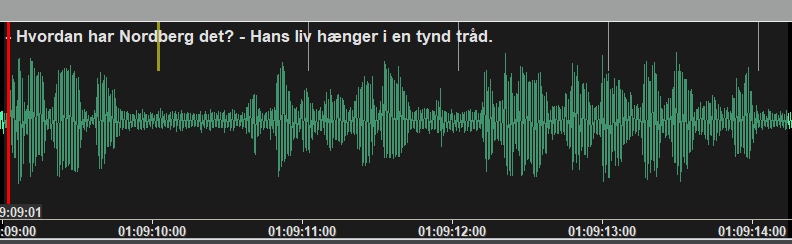
Five layers of information: waveform, cued subtitles, text, scene markers, and timeline.
AI Transcription in Action
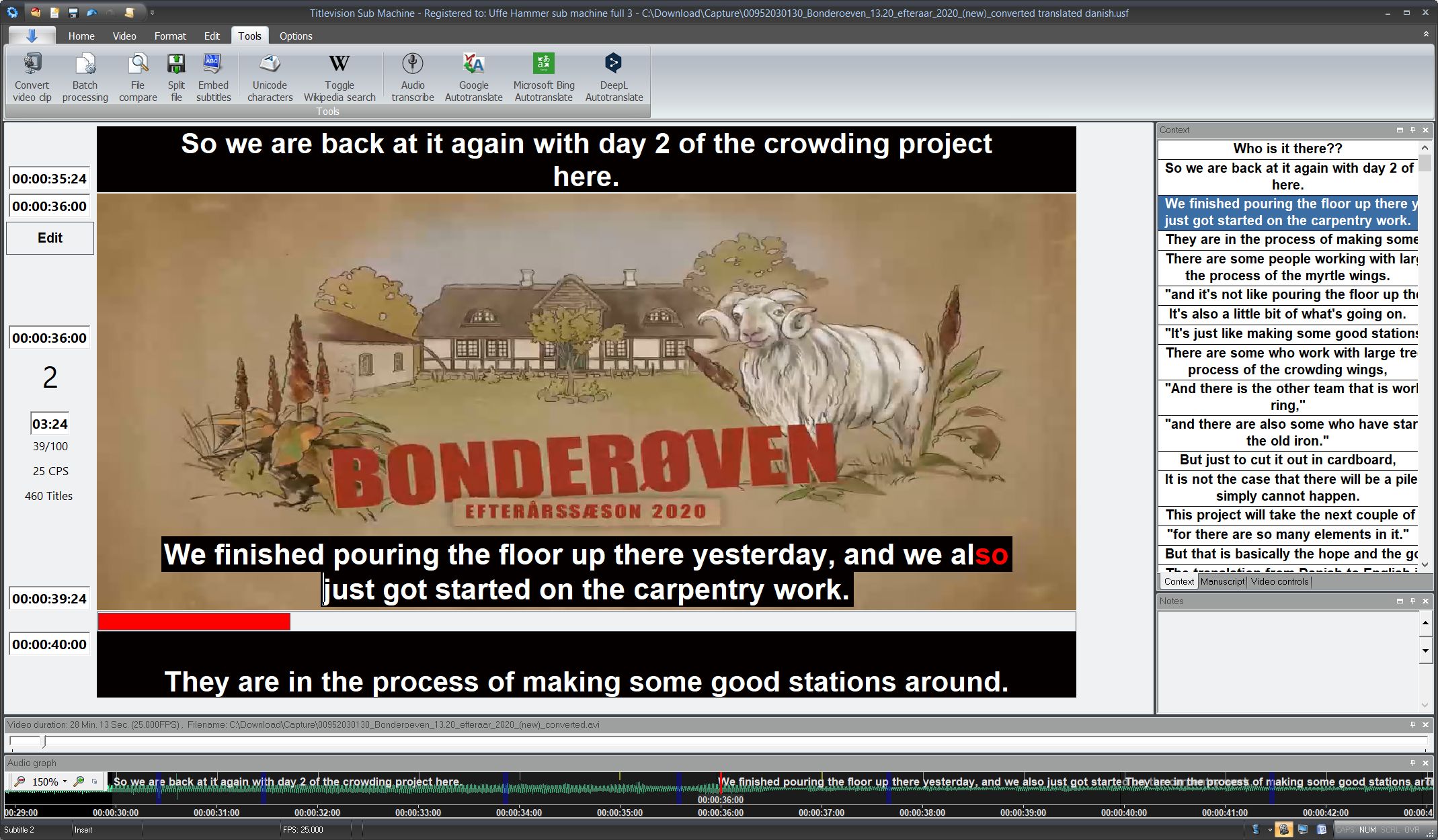
A fully transcribed and translated episode — from Danish audio to English subtitles, powered by OpenAI.
Everything a Professional Subtitler Needs
⏱️ Precision Time-Coding
Advanced automatic and semi-automatic time code insertion. Auto-recut to deduct personal delay. Recording function for real-time cueing. No external time code reader required.
✏️ Powerful Editing Tools
Bulk editing, automatic text fitting, error detection, search & replace, split & merge functions, cut & paste, instant renumbering, and advanced undo for deleted subtitles.
🌐 Online Translation
Built-in support for Microsoft Bing Translate, Google Translate, and DeepL Translate — access them without leaving the application.
📺 Real-Time Preview
See subtitles rendered on the video as you work. Clickable thumbnails show the previous six and next six frames for perfect visual context.
🔤 Typography & Formatting
Smart italics handling, font colouring, justification controls, live spell-checking, and direct access to your Word spell checker without leaving Sub Machine.
📐 Industry Standards
Adheres to broadcast and streaming platform specifications: subtitle duration limits, reading speed rules, character count constraints, and instant overlap deletion.
🔄 Batch File Converter
Convert from any supported input format to any supported output format in bulk. Process entire projects in seconds instead of converting files one by one.
🖥️ Minimal Hardware Needs
No extra monitor required. No special keyboard needed. Runs on all versions of Windows. Customizable skins, layouts, and keyboard shortcuts to match your workflow.
👥 Multi-Language & Collaboration
Full multi-language and multi-character-set support. Separate notes window for each subtitle. Profile handling for different project types and team workflows.
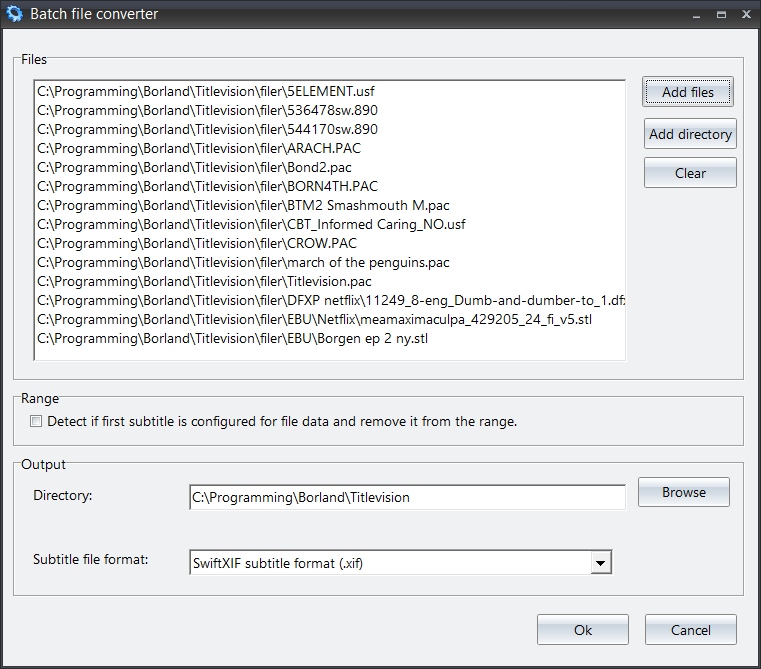
The Batch File Converter — transform entire project libraries between formats in one operation.
Flexible Pricing — No Hidden Costs
Our declared aim is to beat any price with superior products. We keep costs low by skipping expensive ad campaigns and greedy retailers.
Lifetime License
€1,700
DKK 12,500 · One-time payment
Own Sub Machine outright with a single purchase. No recurring fees, no subscriptions. All future updates included.
Yearly Lease
€400/yr
DKK 3,000/yr · Own it after 6 years
Each year of leasing earns a 15% discount toward a full license. After six years of leasing, you own the program entirely.
Pay Per Hour
€1.35/hr
DKK 10/hr · Min. 200 hours
Pay only for the hours you actually work. The counter only runs while the program is open — no countdown when it’s closed.
Prices shown exclude applicable sales taxes.
💬
“We are subtitlers and know what subtitlers want. As a tribute to subtitling colleagues all over the world, we have aimed to make Sub Machine less expensive than similar subtitling systems — and the rest of our software is freeware.”
— Titlevision, Søborg, Denmark · Since 1996
Ready to Transform Your Subtitling Workflow?
Join professional subtitlers worldwide who trust Titlevision Sub Machine for broadcast, streaming, cinema, and DVD projects. Try it free today — no credit card required.
Start Free Trial Explore All Features30+
File Formats
25+
Years of Development
3
Translation Engines
€1.35
Lowest Per-Hour Price
Further information on Titlevision Submachine
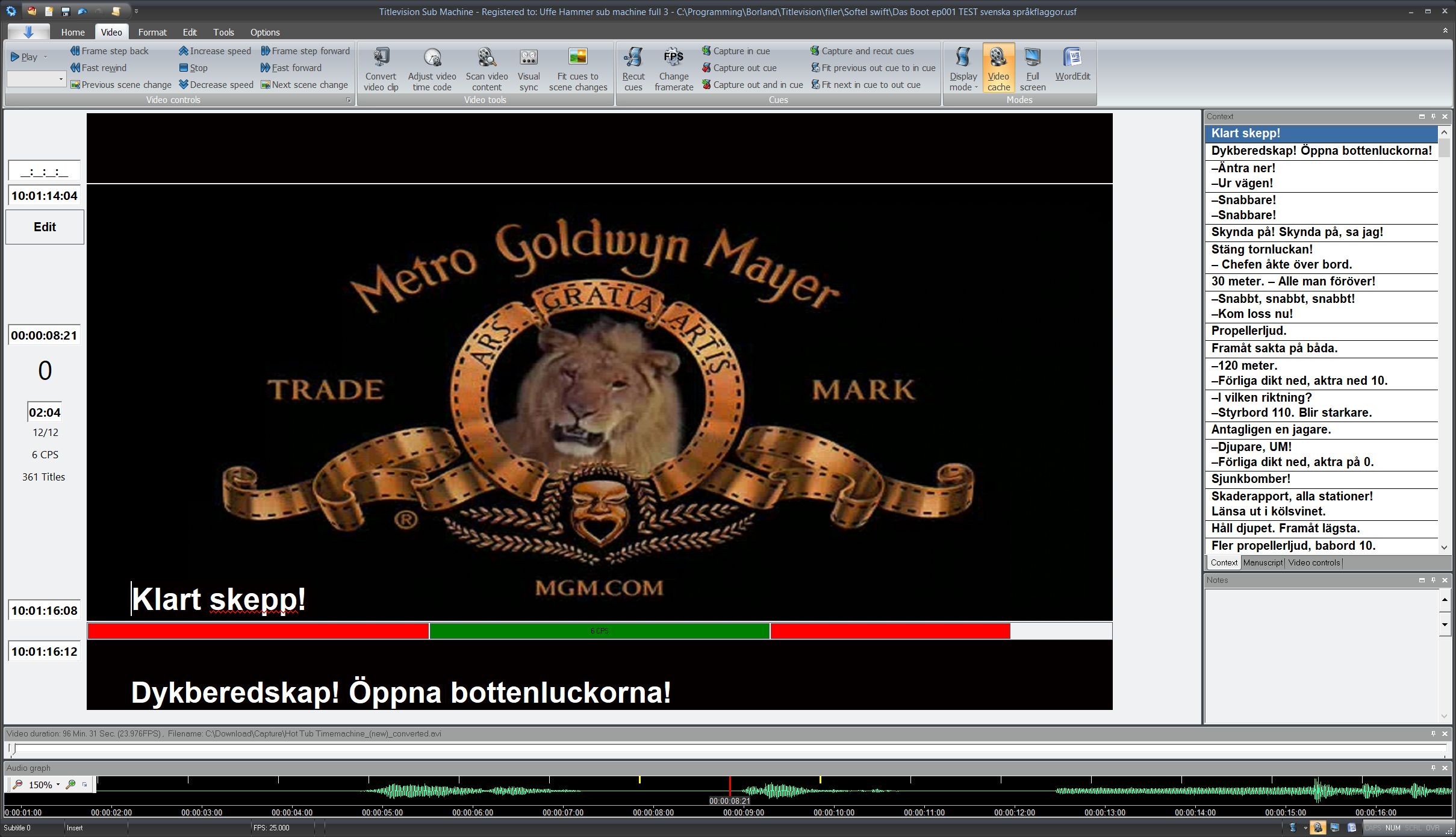
How does TitleVision's video cache work
It's been several years since we could ditch our video tape players and switch to digital video. Nevertheless most video programs still offer only four choices for video handling: Play, stop, fast forward, fast reverse. TitleVision offers many other options for the professionel subtitler: 1 frame forward, 1 frame reverse, jump X frames, jump 1 second back and play again and many, many more features including advanced scene end detection and handling, time code capturing and interactive audio graph.
Subtitling made easy
Created by professional users, Sub Machine offers all the advantages of a video cache prep unit system featuring scene change detection and audio graph.
Sub machine special features
- Audio graph
- Video conversion
- Profile handling
- Visual sync
- Import movie manuscript
- Import/export subrip (srt) files
- Video cache
- Automatic scene change detection
- Many different skins
- Auto correct feature
- Live spell checking
- No need for time code reader
- Smart handling of italics
- Multi-lingual support
- Use your Word spell checker without leaving the program
- Text context window
- Clickable thumbnails of previous six and next six video frames
- Sorting by in cue
- Separate window for notes for each subtitle
- Sophisticated split and merge functions
- Search and replace
- Cut and paste
- Use mouse for cueing
- Recording function
- Auto recut (deduct personal delay from cue)
- Instant renumbering
- Instant deletion of overlapping cues
- Italicizing/justification/deletion of ranges
- Font coloring
- Changing of two connected cues with one keystroke
- Advanced undoing of deleted subtitles
- No extra monitor needed
- No special keyboard needed
Full Office compatible Ribbon menu

The Office compatible Ribbon menu offers several key advantages: it streamlines workflows by organizing commands into intuitive tabs and groups, making tools easily accessible. The Ribbon enhances productivity by reducing the number of clicks needed to access features, while also improving discoverability of commands through clear visual design and tooltips. Its consistent layout across Microsoft Office applications ensures a familiar experience, and it supports customization to suit individual preferences. Additionally, the Ribbon is touchscreen-friendly, facilitates multitasking, and integrates advanced features without overwhelming the user.
Support for all the popular file formats
- Reads and writes Universal subtitle format (.usf), Screen Pac format (.pac), Screen unicode Pac format (.fpc), Screen Rac format (.rac), Scantitling format (.890) and Spruce STL format (.stl).
- Exports Philips dvd, Adobe Encore text, EBU STL, Screen Poliscript, Sonic Solutions dvd, Apple Final Cut Pro, Digital Cinema Package, Deluxe coded cinema test, DFXP for Netflix timed text (.dfxp), Subrip subtitle format (.srt), Swift XIF subtitle (.xif), Timed Text Markup language (TTML xml) and Screen Poliscript text formats.
- Exports RTF Manuscripts and RTF Subtitles.
- Imports EBU STL, Screen Poliscript text, Sonic Solutions DVD, Spruce DVD STL format (.stl), Deluxe coded cinema text (.uns and .tsf), DFXP for Netflix Timed text (.dfxp), Swift XIF subtitle (.xif), Timed Text Markup language (TTML xml) and Subrip (*.srt) subtitle formats.
- Import Film manuscript (.docx) and RTF Subtitle and manuscript (.rtf) formats.
- Imports any amount of text from the clipboard, automatically splitting it up into subtitles.

Let the machines find the scenes
You need no longer waste your precious time searching for scene changes. The computer finds them while you are working..